DSD 4921 RV Support
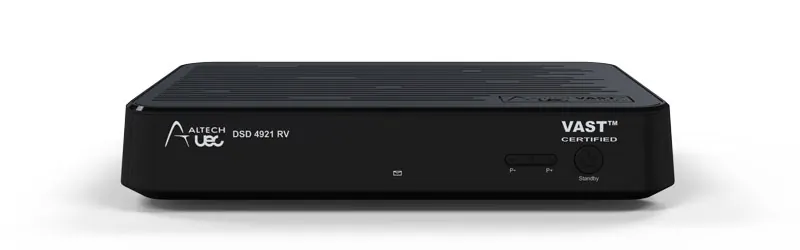
DSD4921RV Support Videos
4921 Frequently Asked Questions
No channel list available
Make sure you have completed the “over the air software update” upon start up. See page 42 of the user manual for instructions.
“Factory Reset” Also Required: Menu> Settings> Installation> Pin 1,2,3,4> Factory Reset.
If no channel list continues to be displayed. Make sure the smartcard has been inserted into the unit correctly. (Gold contact facing down, green side up. Silver arrow going in first)
No Hard Drive Connected (RV model Not PVR model)
The DSD4921RV unit will work with a external usb or hard disk drive with a storage capacity of 8Gb ~ 2 TB. Please see link for recommend drives: https://uec.com.au/support/supported-hard-drives
If your unit is still not detecting the usb or hard drive device, follow these instructions: Disconnect usb or hard drive device, perform “Factory Reset” (see above)
Once “First Time Installation” is complete, connect usb or hard drive device. Go to Menu> Settings> User Preferences> Recording> Set Up Recording Device. The unit will format the chosen usb or hard drive device.
DSD4921RV Not Powering Up
If you are unable to get the unit to power up. Check your external power supply to see if there is a blue light displayed on the power supply itself. If there is no blue light, the power supply is faulty and you will require a replacement. If there is a blue light and no lights on the DSD4921RV, there may be an internal fault.
‘No Signal’ On TV Screen
Make sure your TV is on the correct input channel to view the DSD4921RV (HDMI or AV input).
Recording Start Lead-Time & Recording End Delay
If you are finding that your scheduled recordings are recording for a significant time after the scheduled program is set to finish in the EPG, check your ‘Recording start lead-time’ and your ‘Recording end delay’.
Menu> settings> User Preferences> Recording> Recording start lead-time or Recording end delay.
You will be able to change those actions from anywhere between 5mins-30mins.
The ‘Recording start lead-time’ is the time that the unit will start recording your scheduled recording before the program is supposed to start. For example if your ‘Recording start lead time’ is set to 5mins, your DSD4921RV will start recording 5mins before the program is scheduled to start. It is the same with the ‘Recording end delay’.
Front Panel LED’s : Functionality
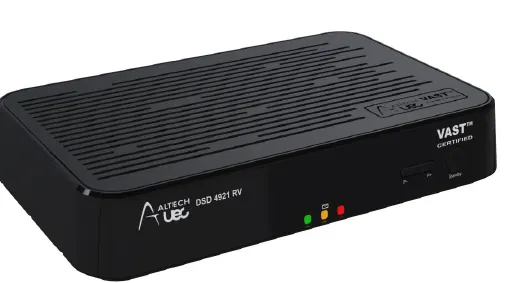
| Left LED - Power LED | |
| Red - Solid | Standby |
| Green | Normal |
| Green - Flashing | IR Activity |
| Middle LED - Status LED | |
| Orange - Blinking | MAIL Recieved |
| Orange - Solid | LNB Overcurrent |
| Red - Solid | Error Banner |
| Green - Solid | Radio Service |
| Right LED - PVR LED | |
| Orange - Solid | HDD Space Low |
| Red - Solid | Recording Busy |
| Green - Solid | Archive Available |
You have installed your DSD4921RV and it is searching for signal (E52). What do you do now?
E52 No services found please rescan
This indicates that your decoder is not receiving any signal. This may be due to bad weather or a faulty connection in the installation. Please also confirm that your satellite dish is pointing to the OPTUS C1 Satellite at 156 degrees east.
NOTE: This is not an issue with your smart card.
You may need to re-point your satellite dish. Please visit https://www.dishpointer.com for help aligning your satellite dish. Should you require any further assistance, do not hesitate to call NAS Australia UEC Support on 07 3015 8790 or email uecsupport@nasaustralia.com.au.
DSD4921 Remote Control Button Reference
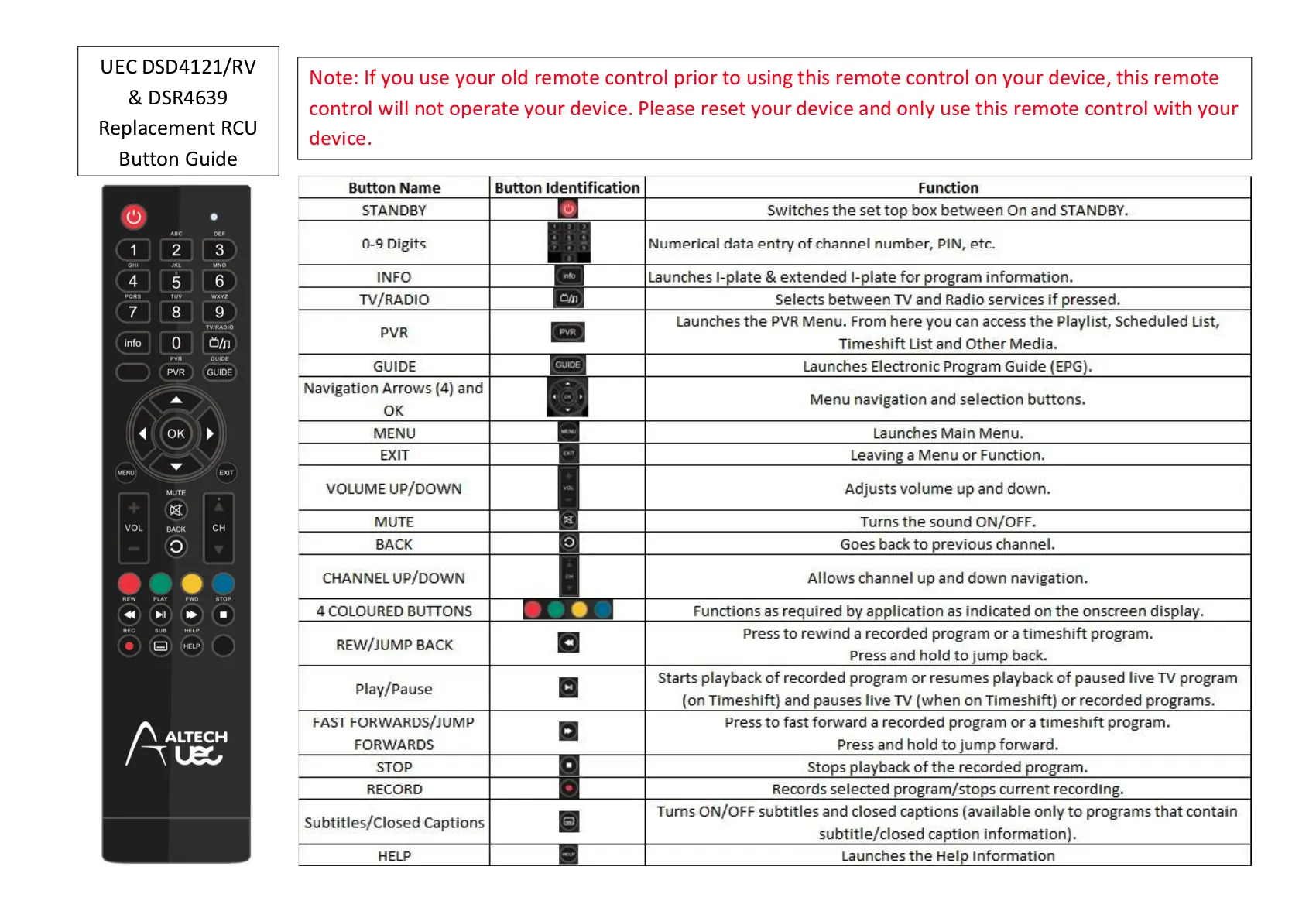
Replacement remote controls issued for DSD4121 set tops are a slightly different version. Please refer to the below button reference guide and note that if you want to use the boxed PVR buttons at the bottom of the RCU, you will need to purchase a 4121 upgrade package.
What does E16-4 "Services Currently Scrambled" or "No Permission to View this Channel" mean?
Your VAST DSD4921RV PVR smart card needs activation or reactivation. Please ensure you have registered your smartcard. If you have already done so please be aware that there is a 48hour processing time. You can also call 1300 993 376 for more information.
If your VAST DSD4921RV PVR has been turned off for a long time, or your decoder has lost the services due to another issue - rain fade or other loss of signal, you can re-hit your smart card on-line by visiting MyVAST
I have not used my DSD4921RV for some time (E19-4 Subscription Status Expired)
This is a common error for travellers and remote viewers who's system has already been activated and working but have not used their VAST decoder for some time. This arises due to the security information contained on the smart card expiring. There are two options to recover from this error.
- Leave the decoder turned on and the information on the smart card will updated to restore all of the activated services. The decoder usually recovers within a couple of hours.
- Reactivate the smart card by entering the smart card details here.
What does E06-4 Smartcard Failure message mean?
Displayed if an invalid smart card is inserted or if the card is incorrectly inserted. Ensure the card is inserted with the contacts towards the Set top box and on the underside. 'Clean the gold contacts on the card with Methylated spirits and then re-insert the card and press reset on the front of the satellite box. If this does not resolve the fault then your set top box will require replacement.
What does E107-4 The Smartcard is not fully authorised mean?
If you have previously had access to the VAST services but have either lost all the services due to an unknown fault or because your decoder was not powered up at the time of registration please visit here for decoder rehit.
The Rehit process rehits or refreshes the information on the decoder smartcard.